AI Task Automation in 2026: Tools, Workflows & Smart Systems
That moment hits everyone. Picture a screen stuffed with too many tabs, messages left mid-sentence, a nagging feeling you're organizing tasks instead of finishing them. What slips in quietly is the grind of handling work rather than making progress - constant scrolling, hunting for files, jumping between apps. It drains effort without anyone noticing.
What if the machine followed your lead, just once?
Change is happening in how tasks get done automatically. Instead of basic rule-based triggers, smart systems now adapt, figure out habits, then act on their own. These are not helpers that wait for orders - they watch, understand, then try things differently. This piece looks at building a powerful setup where software works like a co-pilot. Tools such as Pika Voice Assistant and n8n shape how machines respond without constant direction. Each part connects, reacts, shifts - almost breathes with the workflow. What feels like magic today runs quietly tomorrow.
Your New Co-Pilot: Pika Voice Assistant
Most artificial intelligence lives online. Not this one. Pika Voice Assistant works right on your computer - check it out at pikavoice.com. Think of it like a helper inside your machine, allowed to open programs, handle documents, even run tasks for you. This kind of control usually stays off limits. Here? It's built in.
The Power Of Custom Keyword Triggers
What makes Pika different? It learns your own shortcuts. While other helpers only do fixed tasks - like alarms or forecasts - it listens for words you choose. These signals spark actions across many apps at once. Each phrase becomes a personal command. Not just responses, but chains of steps unfold silently.
The Editing Time Scenario
A voice cuts through the quiet - no more hunting for icons. Your tools wake up when sound hits the air. Just speak, then watch windows unfold on their own. Words become actions without lifting a finger. The screen listens now. What once took clicks arrives by speaking its name. Commands float into place like notes from nowhere. It feels less like working, more like telling. Each phrase pulls up exactly what was needed.
"Hey Pika, it's editing time."
Suddenly Your PC Springs to Life:
- Photoshop launches immediately.
- Your Gmail opens to the "Drafts" folder.
- A window pops up showing your Premiere Pro files. Inside it, the project folder sits waiting.
- Your "Focus" playlist begins on Spotify.
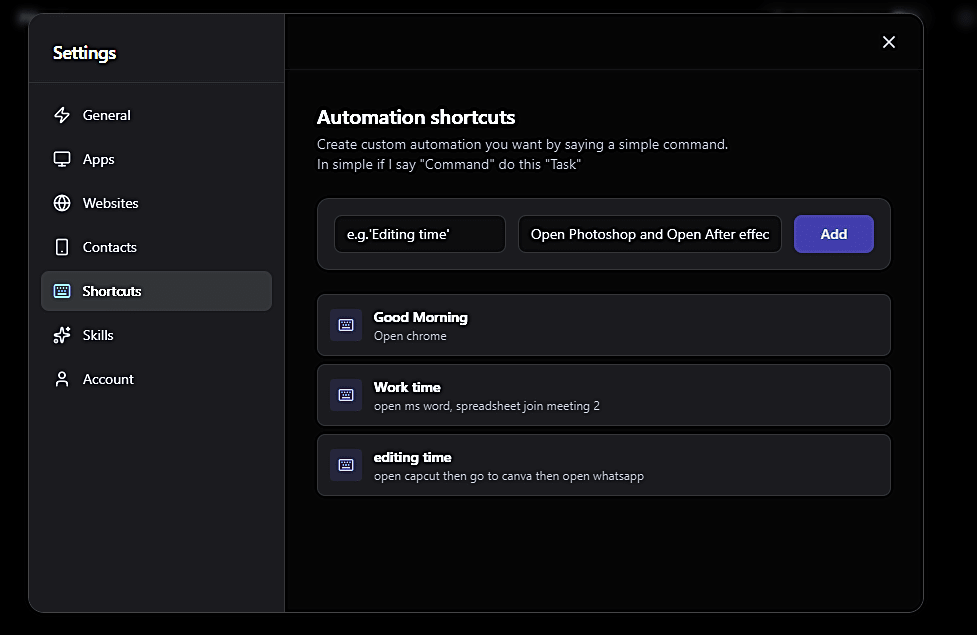
This change goes beyond saving time - it reshapes how you engage. Linking steps under one clear label removes the mental drag that usually stalls progress.
The Self-Upgrading AI: Creating Your Skills
Imagine an AI that learns new tricks without waiting for updates. That's what happens inside Pika's Skill Maker - called new Skill Maker in the app (Just like on going clawdbot). Instead of just following old rules, it grows smarter over time. Not by chance, but because it builds its own tools. One moment it does basic tasks, next it handles complex jobs. Think of it like a helper who teaches themselves better ways to assist. Each skill sticks, stacking up quietly behind the scenes. It shifts from fixed responses to shaping solutions on the fly. What feels futuristic today becomes routine tomorrow.
Teaching Your AI
Start typing your goal in plain words - no coding required inside the Skills section. Just describe what you're after, one step at a time. The AI picks it up like a conversation between thoughts. Nothing rigid, just flow. Type intentions, not commands. Let meaning guide each line. Words become actions without syntax getting in the way. Clarity matters more than structure here. What you aim for shows up through speech-like input. Skip the rules, keep it human.
The Request:
"I want to be able to say 'Prepare the weekly report' and have you open my Sales Dashboard in Chrome, copy the top table, open a new Word document, and paste it there."
A single thought sparks it - Pika watches what you ask, breaking moves into parts like clicking links or jumping between programs. That moment becomes something stored inside, a quiet shift. Each task taught lives now as its own hidden routine.
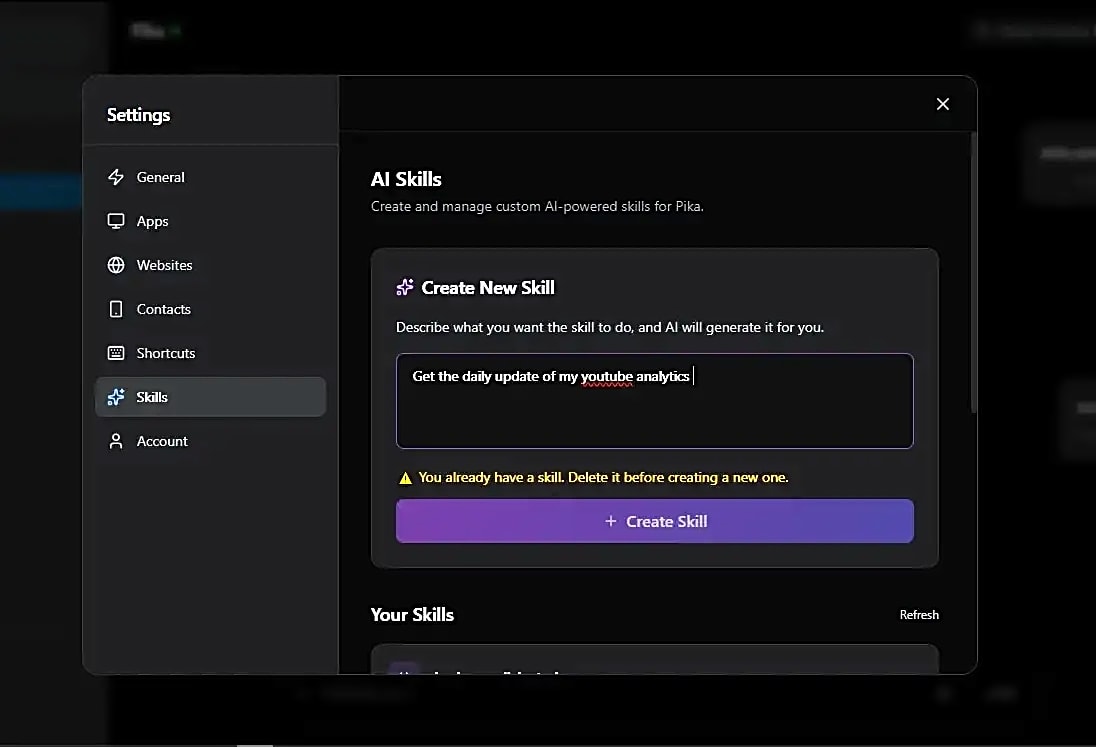
Starting fresh each time helps shape what the tool can do. It runs on models such as Gemini or GPT, so adjustments stick. Picture telling it, "Next time you handle that task, send a copy to my manager too." That extra step gets remembered. From then on, the behavior shifts without needing a restart.
Each time you interact, your assistant sharpens its understanding. Instead of relying on preset coding, it grows through your guidance. The real boundary isn't software - it's your own input.
Scaling with n8n: Low-Code Automation
Most days, Pika runs your desktop like a pro. Yet every now then, tasks live way out there - floating around online. That kind of job? Handled by n8n.
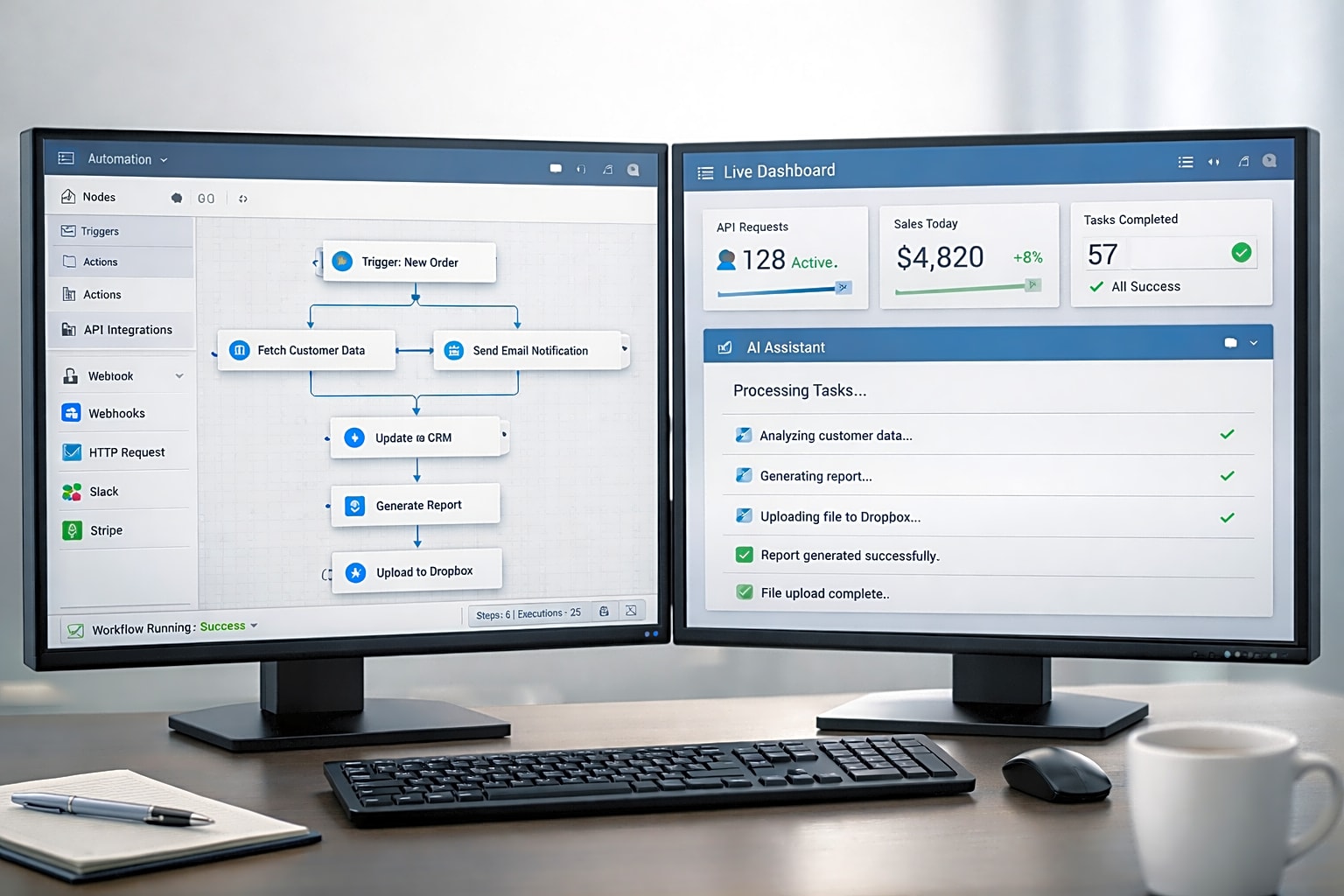
Picture Zapier as training wheels. Now imagine n8n: handcrafted, powerful, built for those who want control. This tool works with more than 400 apps - Slack, Notion, Google Sheets - in deep, intricate patterns. Instead of drag-and-drop simplicity, it offers flexibility through code-like logic. While one guides gently, the other lets you steer sharply. Complexity here isn't hidden - it's shaped by you.
Why Professionals Choose n8n:
🔒 Complete Data Control
Holding power over your information? Run n8n directly on hardware you manage. Your confidential company details stay where they belong - under your roof, untouched by outside systems.
💰 No Usage Limits
Here's how it works. Most tools hit you with a fee each time something automates. Not this one. Running endless tasks? You won't pay extra. The self-hosted option skips those charges completely. Thousands of actions can happen at no added cost.
🤖 AI-Powered Workflows
Imagine adding smart thinking to tasks. N8n offers special tools powered by artificial intelligence. These pieces fit right into your process flow. Picture an automatic system that reads emails. It might sort messages based on mood. One part checks tone. Another decides urgency. A step later, it forwards critical ones. The whole chain runs without help. Each piece passes data ahead. Smarts build step by step. Decisions happen inside the pipeline. No outside apps needed.

Example Workflow: Smart Email Sorting
- Keeps an eye on Outlook, watching for incoming messages.
- A computer brain checks each message. Whether it's someone upset or happy shows up fast. Not every note gets this look. Only certain ones move through the system this way. The call happens in seconds. No humans needed at this step. What comes next depends on that first check.
- A complaint lands differently - it writes back with care while alerting you through Slack.
More Stylish Automation Tools for 2026
Fresh energy fills the world of automated systems. Watch out for these extra tools worth noticing:
Bardeen.ai - The Browser Specialist
Life stuck in a browser? Bardeen steps in. Click once, grab details from sites like LinkedIn or Zillow. Data lands straight into Notion. Works fast, skips the mess. A quiet helper when screens take over.
Lindy.ai - The Autonomous Agent
Lindy builds helpers powered by artificial intelligence. Picture one sorting your schedule, another handling messages, yet a third digging into data. These separate pieces share information so meetings never clash while emails get cleared quietly. Each works alone but lines up with the others behind the scenes.
Make.com - The Visual Logic King
Floating shapes form connections across the screen - that's how workflows appear on Make, once known as Integromat. Picture each step linked by lines, bending and branching like paths through woods. Visual flow matters here, turning sequences into something you can follow at a glance. Logic spreads outward, smooth and clear, almost like watching thoughts unfold.
Start Automating Today with Simple Steps
What if you could have those hours back? Try the Elegant Workflow like this:
Phase One: The Audit
Grab a notebook - or use any digital notes app - for one full day. Each moment you spot yourself doing the same task again - maybe changing how files are named, pulling details off web pages, or typing out thank-you messages - jot it down right then. That list? Those repeated actions are exactly what could run on their own later.
Phase Two: Desktop Control (Pika Method)
Every morning, your computer could already be ready before you are. Try installing a helper app such as Pika. Instead of clicking everything one by one, let it handle the start. Name the command "Start my day," so when it runs, your schedule shows up first. Then your tasks appear right after, followed by your messages loading on their own. Watch how things open without touching a key. That moment - you realize doing less actually gets more done.
Phase 3: Connecting the Cloud (Using n8n or Zapier)
Start with just one job that connects different apps. Perhaps each fresh lead from a web form should get an AI-written summary delivered straight to your mobile. Try building the connection using something like n8n.

The Philosophy Of Automation: Balancing Professional And Casual
Not laziness drives automation. Strategy does. When machines handle routine work, human minds shift toward invention. Think of it this way - let software manage repetition. That leaves space for insight, connection, conversation. Focus moves where it belongs: on ideas, decisions, understanding. What gets done by code once now fuels deeper thinking instead.
Imagine AI like a mirror that keeps moving after you stop. Tell it to pick up something new, instead of treating it like setting up a tool - this is shaping a twin who never sleeps. It acts when you rest, learns while you pause, lives in the background like breath. Not a substitute, simply more hands where one body ends.
Final Thoughts
These days, getting into automation feels almost effortless. Forget needing years of coding school just to start. With something like Pika Voice Assistant - always listening, always updating - you can jump right in. Or take n8n, quietly linking apps together behind the scenes. Ready when you are.
What will you quit handling by hand first?
Grab the tools, define your cues, then step back while automation tackles the grind. That calmer version of you - the one surrounded by order - might just smile later.
Got something out of this guide? Stick around. We break down AI tools that don't waste your minutes. New ones pop up often.
Sources & Resources
- pikavoice.com - Pika Voice Assistant Official Site
- n8n.io - n8n Workflow Automation
- bardeen.ai - Browser Automation Tool
- lindy.ai - Autonomous AI Agents
- make.com - Visual Workflow Builder
- home-assistant.io - Home Automation Platform
- wordware.ai - AI Writing Tools